Category: Flowhere

  • One Dot a Day: Daily Rating Tracker for October 2026 [Flowhere]

    One Dot a Day: Daily Rating Tracker for October 2026 [Flowhere]

    What does a month look like when you rate just one part of your day?

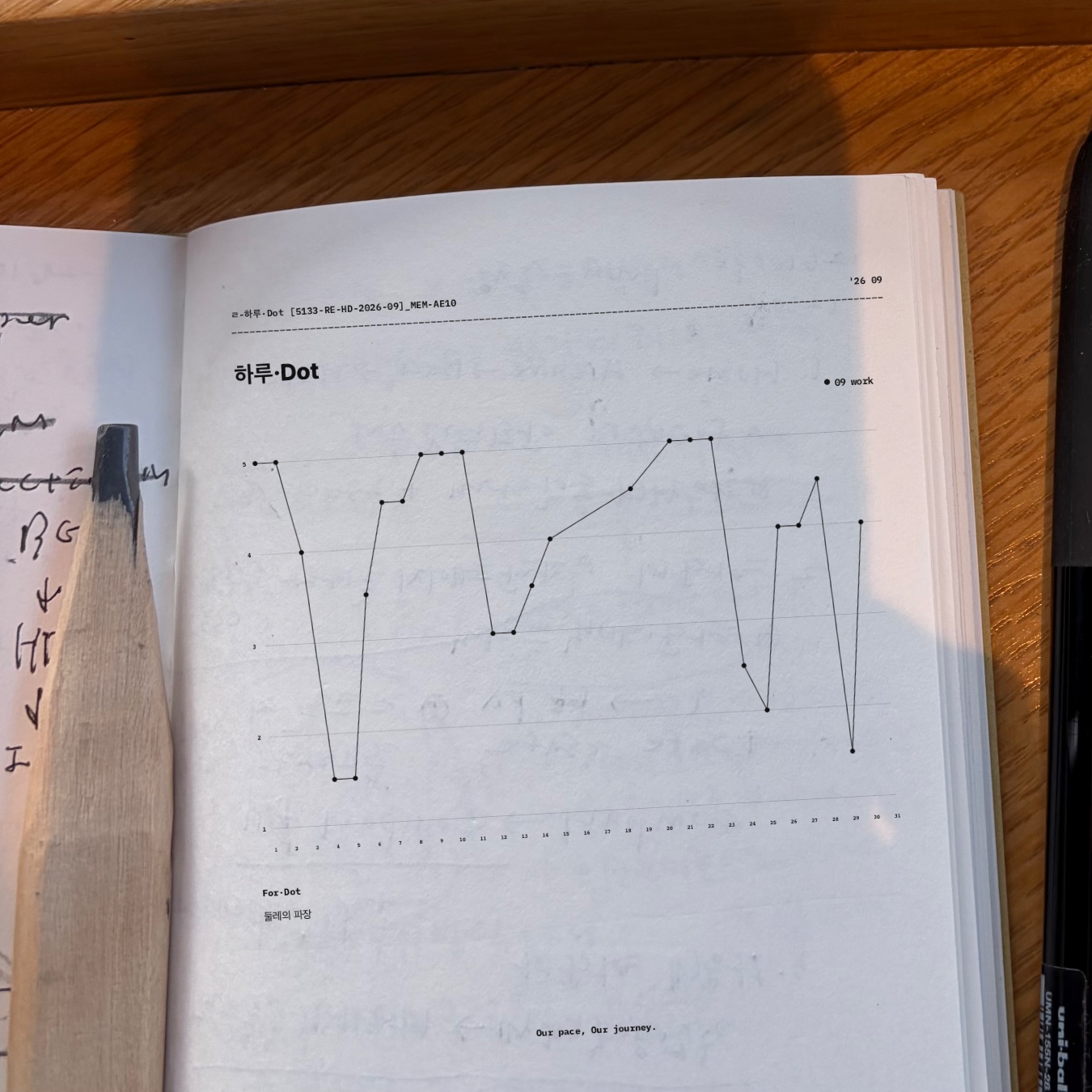
    Throughout September 2026, I used 하루·Dot to track work on a scale from 1 to 5. The result is the graph shown in the featured image: daily ratings connected into a line, revealing steady stretches, sudden drops, and changes across the month.

    하루·Dot (Haru·Dot) is a web-based daily rating tracker in Flowhere. You choose what to track, add a dot for each day you record, and see your ratings form a graph over time.

    You can start your own October record in Flowhere and export the results as PNG, JPG, or PDF for Goodnotes or your personal collection.

    September 2026: Tracking Work With One Dot a Day

    The featured photograph shows my actual September work ratings on a printed journal page.

    The line drops sharply near the beginning of the month, rises again, and reaches several higher points before changing direction toward the end.

    Each dot represents a rating I recorded for that day.

    The graph does not tell you what happened at work or why I chose a particular score. It shows how those personal ratings changed over time.

    Seeing the dots together makes it easier to notice a stretch of similar ratings or a sudden shift that might be less obvious when looking at individual days.

    Choose Your Lens and Record a Daily Rating

    In 하루·Dot, a Lens is the category you choose to track.

    You can use it for mood, energy, concentration, work, or another measure that matters to you. The September example uses work, but the recording method stays the same regardless of your chosen Lens.

    Tap or drag to place a rating from 1 to 5, with 0.5 increments available for more precise entries.

    Each recorded rating becomes a dot on the graph.

    Below the graph, For·Dot gives you space to add a short note when a number alone is not enough. In my September record, a brief handwritten-language note appears beneath the line graph.

    From Daily Dots to a Longer-Term Graph

    하루·Dot offers four time ranges for viewing your ratings:

    1M · 3M · 6M · 1Y

    The one-month view shows daily changes in detail. A three-month, six-month, or one-year view brings more of your recorded history into the same graph.

    You continue recording in the same way. What changes is how much time you can see at once.

    Saved records can also be revisited through Flowhere’s Archive, so earlier ratings remain available when you want to look back.

    Start Your October 2026 Daily Tracker

    Open 하루·Dot in Flowhere and choose a Lens for October.

    Add your first rating, then continue on the days you want to record. You can leave a note in For·Dot and check how the graph develops as the month progresses.

    하루·Dot runs in your browser rather than as a Goodnotes template. Once you have recorded your ratings, you can export the graph as PNG, JPG, or PDF.

    Save the PDF in Goodnotes alongside your other journal pages, or keep the PNG or JPG as an image of your record. The original record remains in Flowhere for continued use.

    Prefer writing schedules, notes, and monthly reflections instead of tracking a daily rating? Reflection Monthly offers another way to record October in Flowhere.

    → Explore October 2026 Reflection Monthly in Flowhere

    One dot a day.

    𝑶𝒖𝒓 𝒑𝒂𝒄𝒆, 𝑶𝒖𝒓 𝒋𝒐𝒖𝒓𝒏𝒆𝒚.
  • October 2026 Monthly Photo Journal — BOM Grid in Flowhere [no.5133]

    October 2026 Monthly Photo Journal — BOM Grid in Flowhere [no.5133]

    Looking for a way to turn your everyday photos into a monthly photo journal?

    BOM Grid is a web-based photo journaling page in Flowhere. Instead of keeping photos scattered across your camera roll, you can arrange them by date on a monthly calendar and see the moments you chose to capture throughout the month.

    Add your photographs, leave a short note in For My BOM, and export the page as PNG, JPG, or PDF for Goodnotes or your personal collection.

    This post uses a real September 2026 BOM Grid to show how an empty calendar becomes a photo diary—and how you can begin your October 2026 record.

    How to Build a Monthly Photo Journal

    BOM Grid uses a dated monthly calendar with individual spaces for photographs.

    Choose a month and year in Flowhere, then add photos to the dates you want to remember. A single image might capture the weather, a place you visited, something you read, or an ordinary scene from your day.

    You can leave dates empty. The grid follows the days of the month without requiring a photograph for every one.

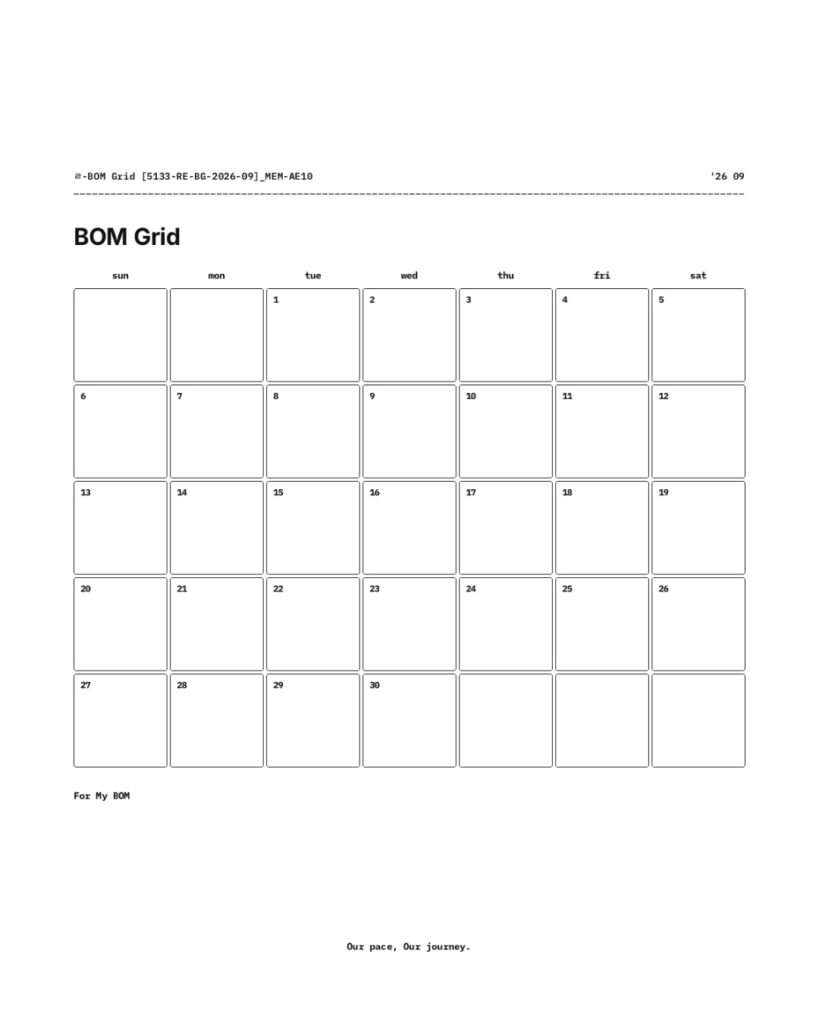
    Blank September 2026 BOM Grid with dated photo boxes and a For My BOM note area.

    September 2026: A Month Told Through Photos

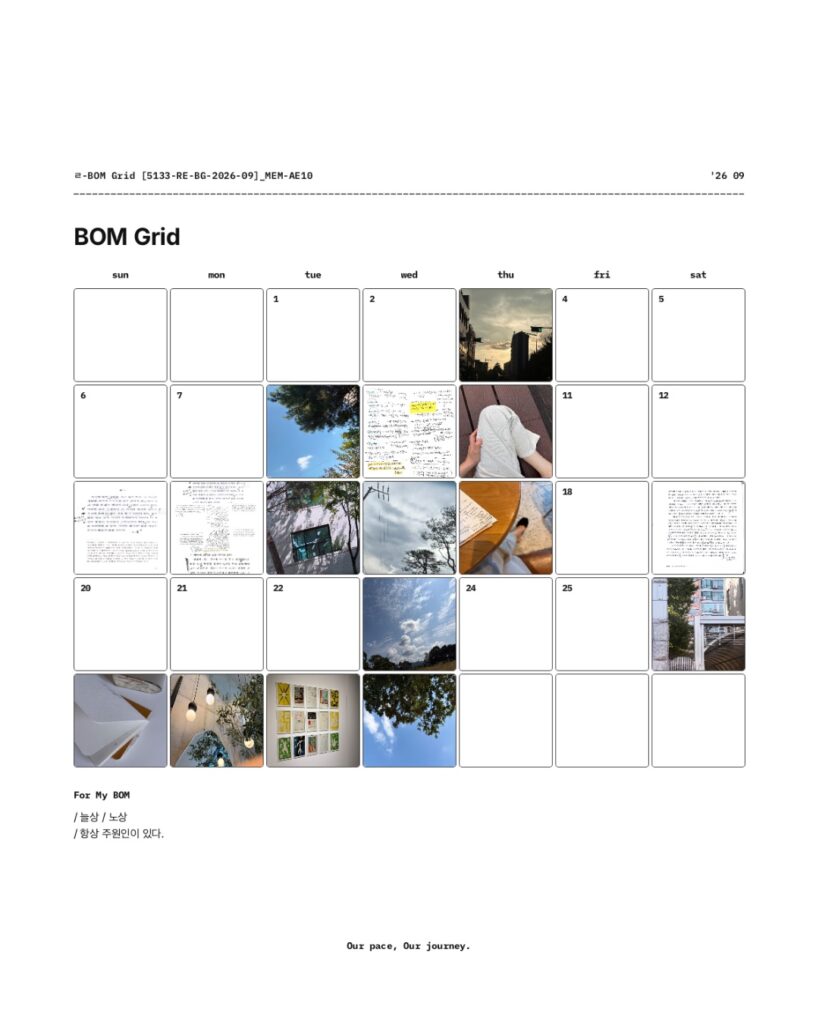
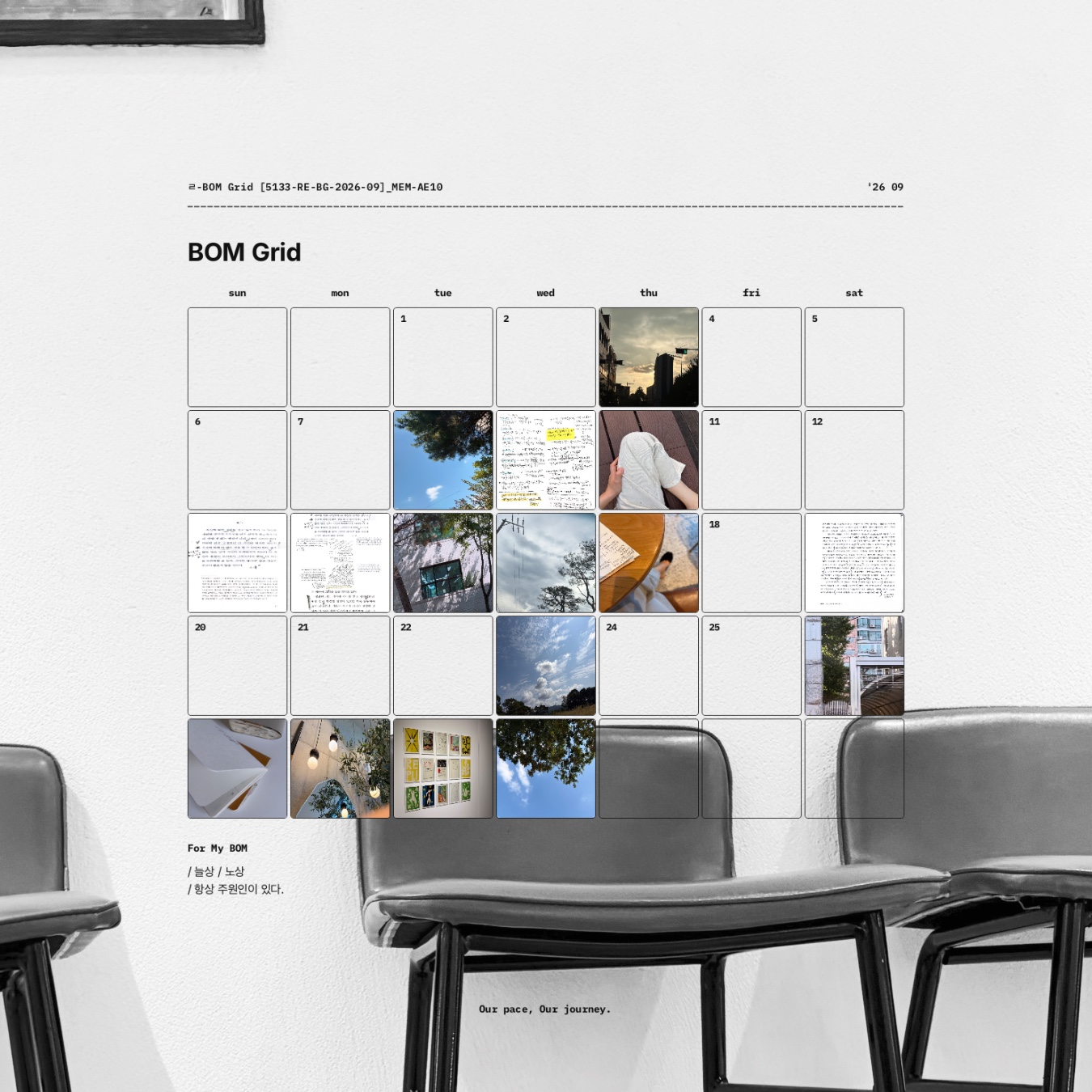
    My September BOM Grid brings together photographs of skies, trees, streets, interiors, and pages of notes.

    Some dates contain photographs, while others remain blank. Viewed together, the images form a visual record of September without needing a written entry for each day.

    Beneath the calendar is For My BOM, a space for a few words or a short thought about the month. In this example, the note sits below the completed photo grid.

    The photographs show individual moments. The monthly layout lets you see them together.

    September 2026 BOM Grid filled with photos of sky, trees, notes, streets, and interiors, with some date boxes left blank.

    Export Your Photo Journal for Goodnotes or Your Own Layout

    BOM Grid lets you download your monthly page as PNG, JPG, or PDF.

    You can save the completed photo journal as a PDF and keep it in Goodnotes alongside your other records, or use a JPG as a single image of the month.

    PNG also supports a transparent-background option. This lets you place the photo grid over another photograph or background, as shown in the featured image, where the September grid appears over a black-and-white interior photograph.

    If you prefer to arrange your photos outside Flowhere, you can download a blank monthly layout as well.

    The same calendar can therefore work as a digital photo diary, a saved PDF, or part of a larger visual composition.

    Keep Your Monthly Photos in a Personal Archive

    A monthly photo journal can also become something you return to later.

    When you save your records in Flowhere, you can revisit earlier months through the Archive. As records accumulate across different years, photographs from the same month can become part of a five-year view of your personal history.

    A photograph that seemed ordinary when you took it may stand out differently when you see it alongside records from another year.

    Start Your October 2026 Photo Journal

    Open BOM Grid in Flowhere and choose October 2026.

    Add photographs to the dates you want to keep, leave a note in For My BOM if you like, and save or export your monthly page.

    You can begin with the photographs you already have and continue adding to the grid throughout the month.

    Prefer to keep a month through writing and notes rather than photographs? Reflection Monthly offers a different way to record the month on one page.

    → Explore Reflection Monthly in Flowhere

    One month of photographs, collected on one page.

    𝑶𝒖𝒓 𝒑𝒂𝒄𝒆, 𝑶𝒖𝒓 𝒋𝒐𝒖𝒓𝒏𝒆𝒚.
  • October 2026 Monthly Planner Online with PDF Export — Reflection Monthly [Flowhere]

    October 2026 Monthly Planner Online with PDF Export — Reflection Monthly [Flowhere]

    Looking for an October 2026 monthly planner you can use online or save as a PDF for Goodnotes?

    Reflection Monthly in Flowhere lets you record October directly in your browser, then export either a blank monthly page or your completed record as a JPG or PDF.

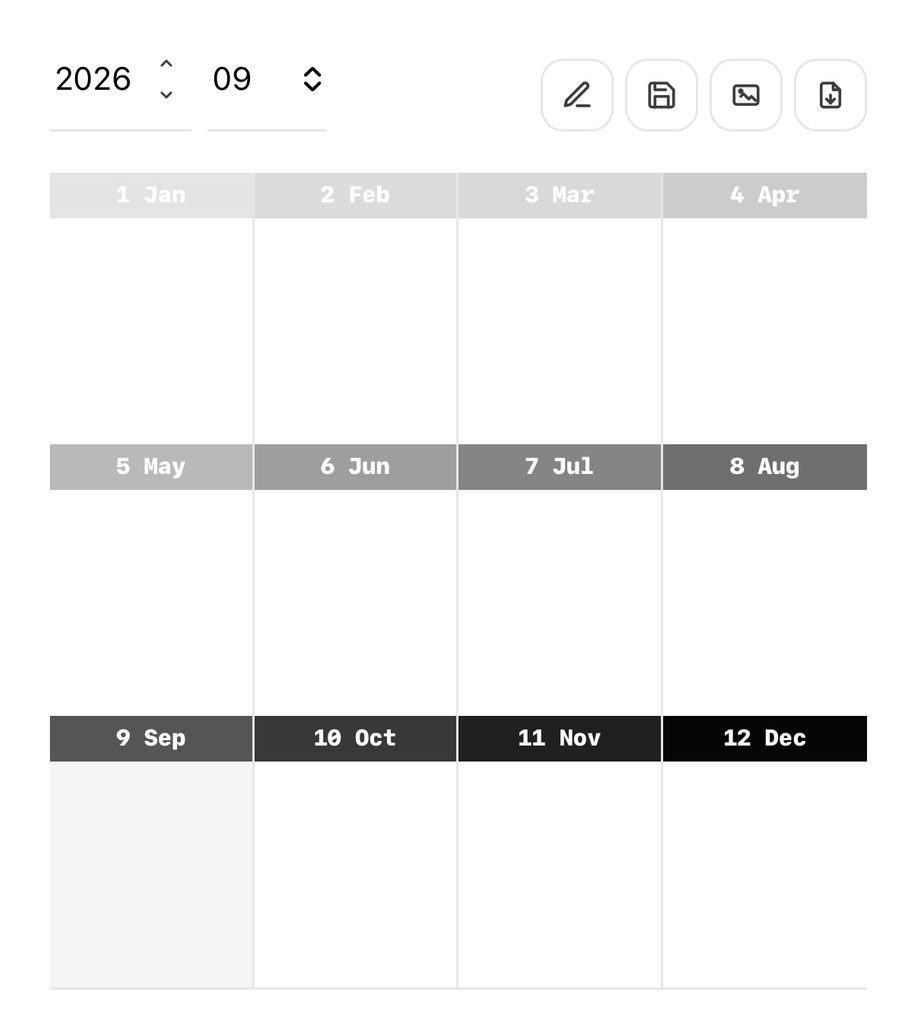
    The layout combines a dated monthly grid with a 12-month Reflection Box, so schedules, short journal entries, notes, and reflections can share one page.

    This post also includes a look at my September 2026 journal page and how to continue the same format into October.

    Start With a Blank October Planner or Record Online

    There are two ways to use the October 2026 page in Flowhere.

    1. Download a blank monthly planner

    Open October’s Reflection Monthly page and export the blank layout as a PDF or JPG.

    You can import the PDF into Goodnotes, write on it in another PDF annotation app, or keep the file alongside your existing journal pages.

    2. Write directly in Flowhere

    Use the dated grid to add schedules, notes, photographs, or short entries throughout October.

    Save your page as you go, return to it when you want to add something, and export the record whenever you need a separate file.

    Both options use the same Reflection Monthly layout. The difference is where you prefer to write.

    Inside the October 2026 Reflection Monthly

    Reflection Monthly brings two recording areas together on a single page.

    Monthly Grid: Plan and Journal by Date

    The lower section is a dated calendar for October 2026.

    You might mark an appointment on one day, add a project note on another, or keep a short journal entry beside a date you want to remember.

    The grid does not assign a separate purpose to each area. You can use it for practical planning, personal journaling, or both.

    Reflection Box: Look Across All 12 Months

    Above the monthly grid are 12 boxes representing January through December.

    Rather than completing a conventional year-end summary, you can use these boxes to note how you see the year from October.

    A word, a date, a short thought, or a small mark can be enough.

    Looking at January from October may bring up something different from what you noticed in September. The Reflection Box leaves room for those changing perspectives.

    From My September Journal to October

    My September 2026 Reflection Monthly is an example of how this layout can be used as an ongoing monthly record.

    The page does not need to separate planning from journaling. Schedules, observations, and notes can remain together on their original dates.

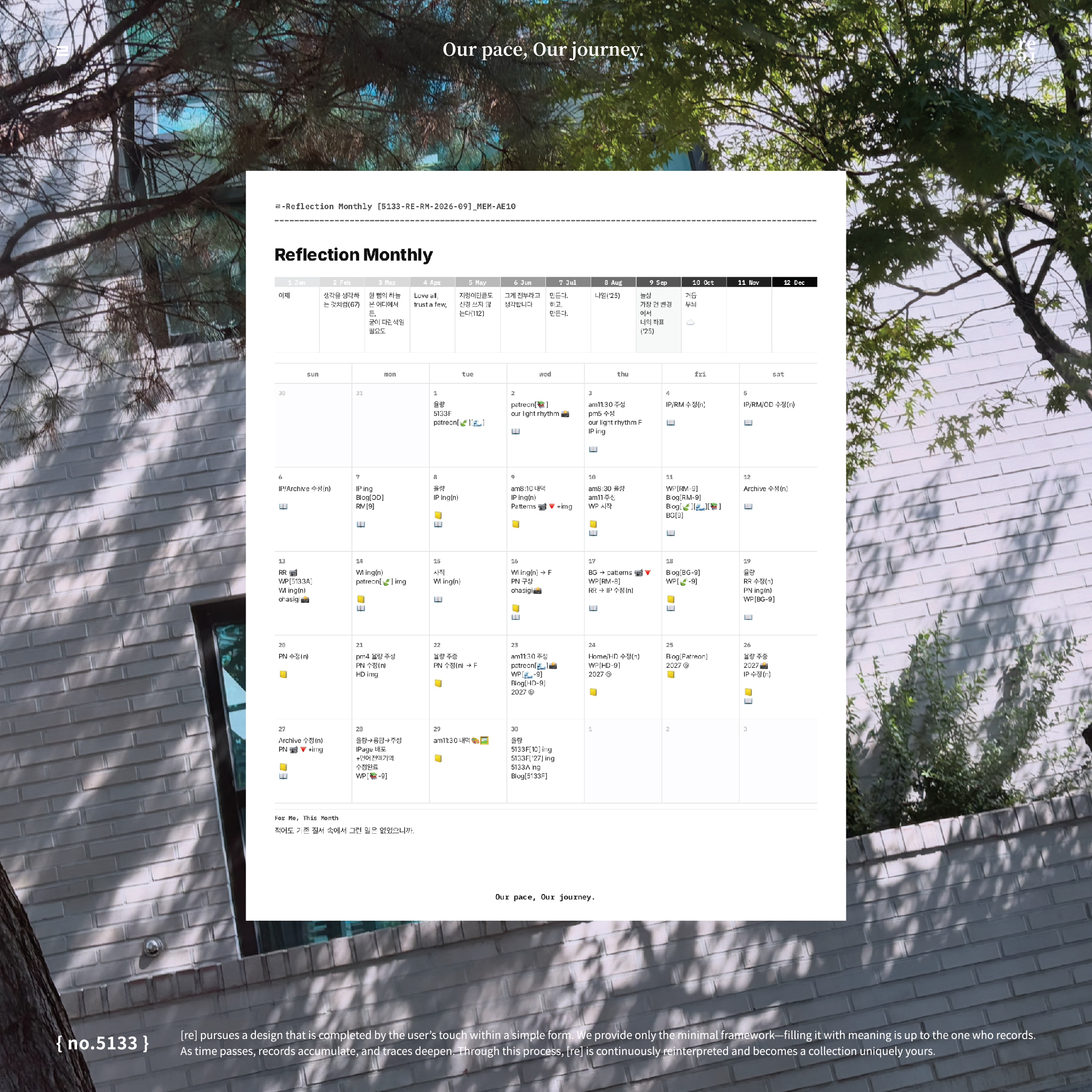
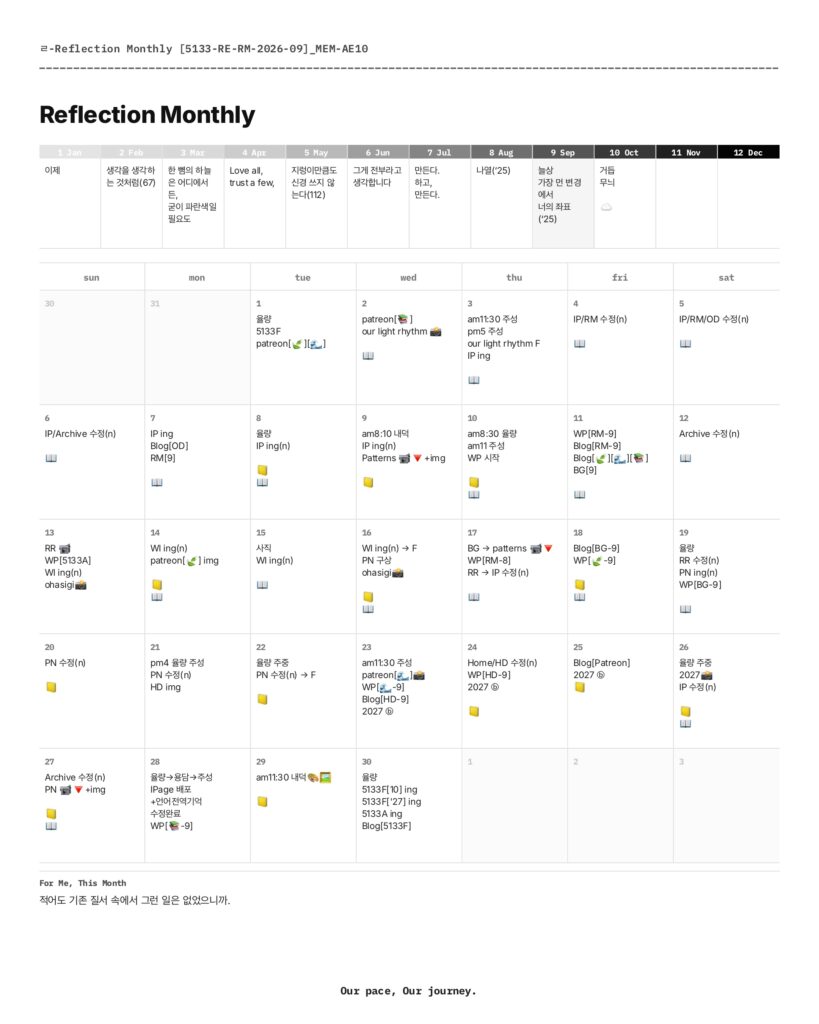
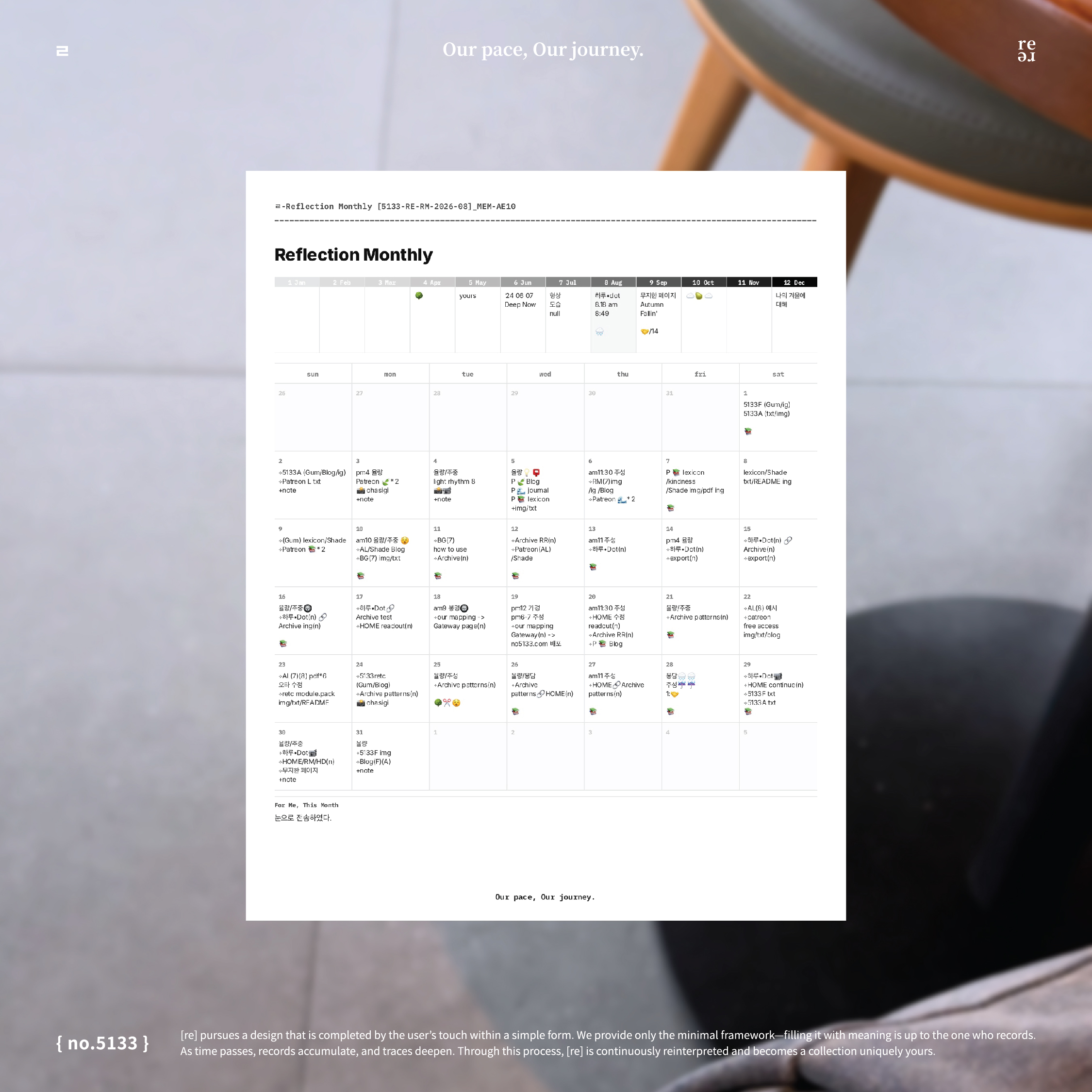
    September 2026 Reflection Monthly page showing a 12-month Reflection Box and a dated calendar filled with work schedules, project notes, and reminders.

    Moving into October does not require a new recording method. You open the October page and decide what belongs there.

    You can also return to September if there is something you want to add or look at again.

    Keep Your Monthly Pages in Goodnotes

    Reflection Monthly runs in your browser, so it is not a Goodnotes template that you need to install before using Flowhere.

    However, you can export the page as a JPG or PDF and bring that file into Goodnotes.

    This gives you the option to keep your monthly pages alongside other digital notebooks, whether you prefer to write in Flowhere first or begin with a blank exported PDF.

    Prefer a ready-made monthly planner PDF?

    Return to October in Another Year

    Flowhere also connects monthly recording with its Archive.

    As records accumulate, the same calendar month can be viewed across different years through a five-year mirror.

    An October 2026 page can eventually sit alongside October records from later years, making it possible to revisit what you left at different points in time.

    For now, the starting point is one October page.

    Open Your October 2026 Reflection Monthly

    You can begin with a blank page, record directly in Flowhere, or export the layout for use in Goodnotes.

    Open October, add what matters to you, and return when there is something more to record.

    One month, seen from where you are now.

    𝑶𝒖𝒓 𝒑𝒂𝒄𝒆, 𝑶𝒖𝒓 𝒋𝒐𝒖𝒓𝒏𝒆𝒚.

    1. One Dot a Day: A Simple Daily Mood Tracker in Flowhere — 하루·Dot [no.5133]

      One Dot a Day: A Simple Daily Mood Tracker in Flowhere — 하루·Dot [no.5133]

      Not every day needs a full journal entry.

      Sometimes one dot is enough.

      Flowhere’s 하루·Dot is a simple daily tracker that lets you place one dot on a 1–5 scale and see how those dots form a line over time.

      You decide what the dot represents—mood, energy, focus, work, physical condition, or something else you want to keep noticing.

      You can record in 0.5 steps, view your records across 1 month, 3 months, 6 months, or 1 year, and export the page as PNG, JPG, or PDF.

      The images in this post show my actual 2026 records as they appear across the 1M, 3M, 6M, and 1Y views.

      하루·Dot at a Glance

      ItemDetails
      Daily recordOne dot
      Scale1–5
      Precision0.5 steps available
      InputTap or drag
      LensChoose what you want to track
      Views1M · 3M · 6M · 1Y
      Short noteFor·Dot
      Save pageYes
      ExportPNG · JPG · PDF
      Goodnotes useExport and continue with notes or handwriting
      ArchiveRecords can continue in Flowhere

      One Dot a Day

      하루·Dot starts with a very small action: decide where today sits on your own 1–5 scale and leave one dot.

      You can use whole numbers or record in 0.5 steps when you want a little more precision.

      One dot does not need to explain the whole day.

      Its meaning comes from the Lens you choose and from the other dots that gather around it over time.

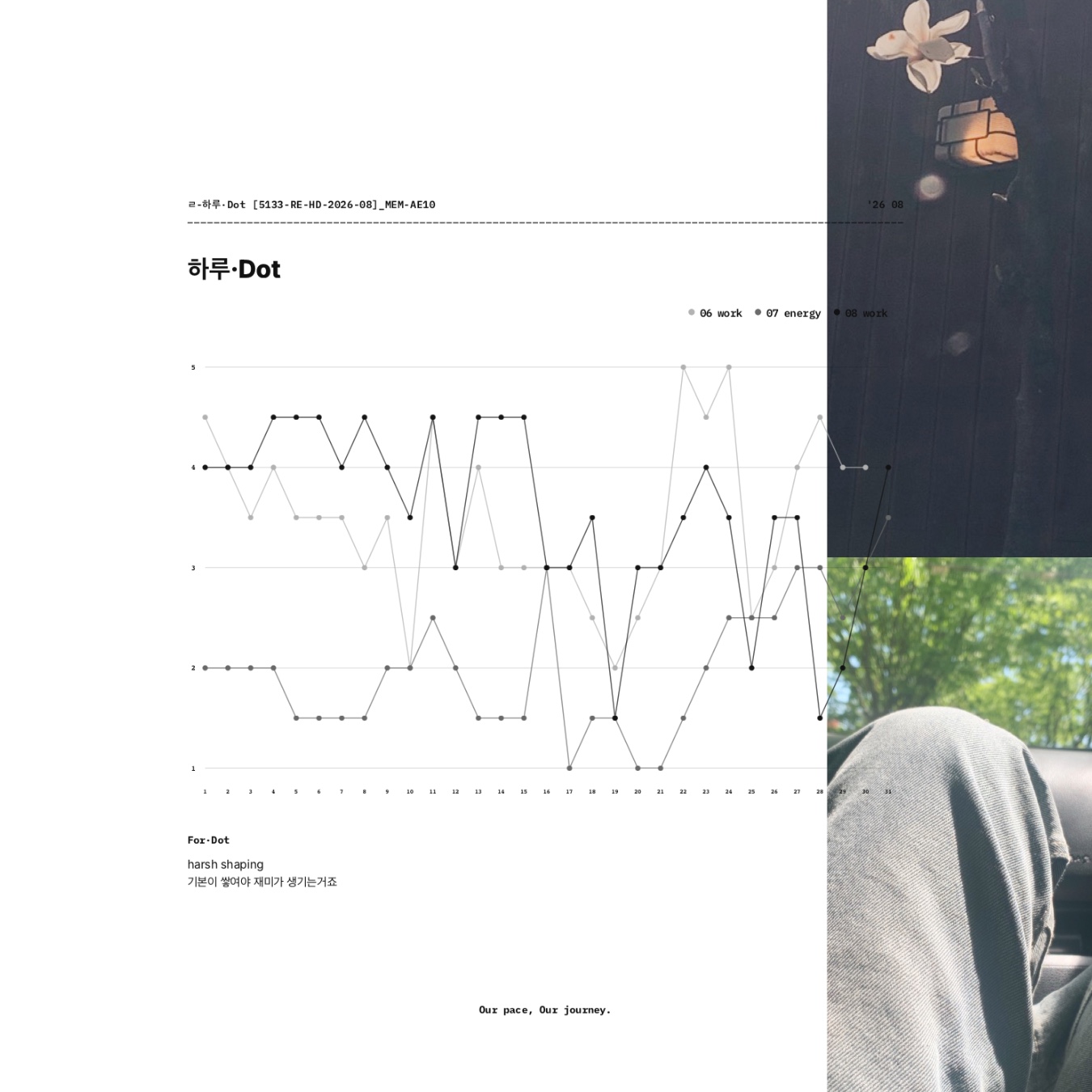
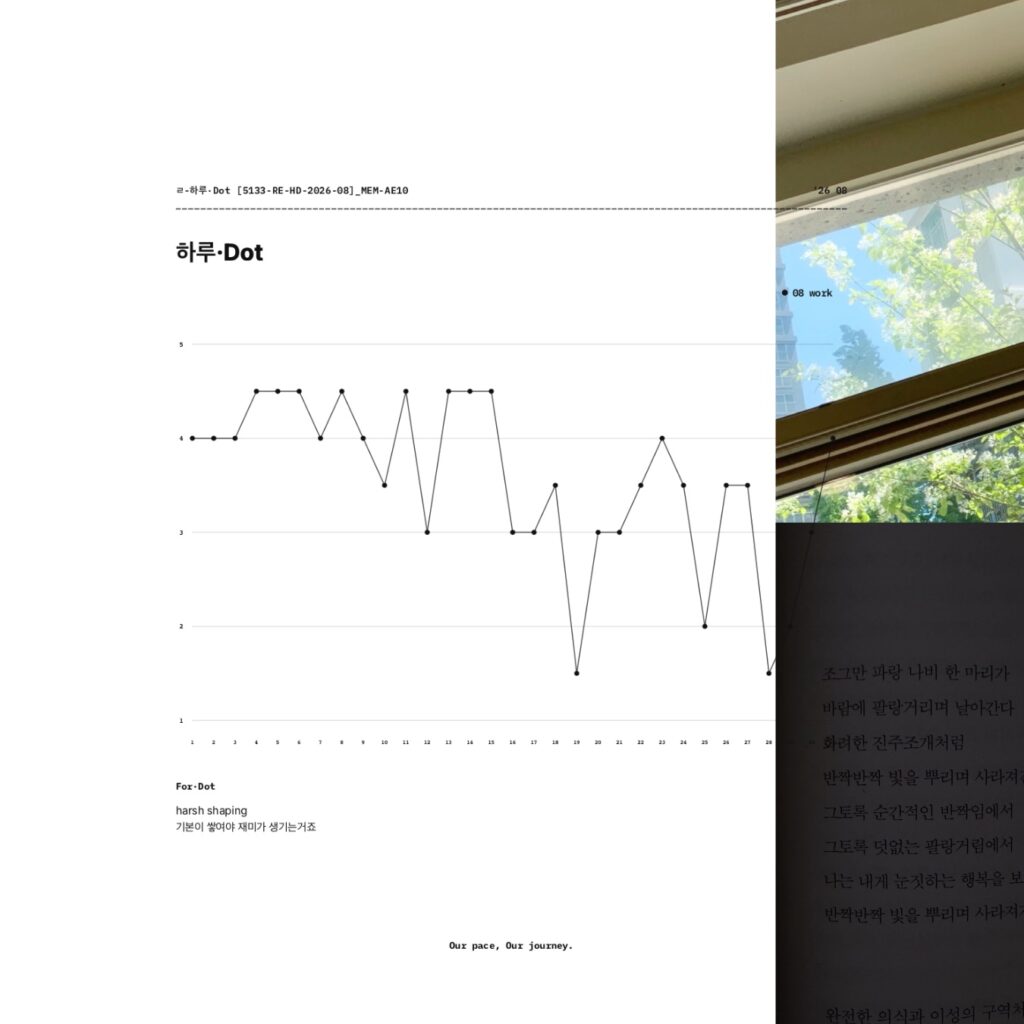
      In the August 2026 view shown below, the Lens is work.

      The individual scores move up and down across the recorded days. Seen together, they begin to form a visual flow rather than a series of isolated ratings.

      August 2026 하루·Dot 1-month view showing recorded work ratings as connected dots on a 1–5 scale beside everyday images.

      As more dots accumulate, a single score becomes easier to see as part of a larger record.

      From One Month to a Longer View

      하루·Dot lets you change the time range without changing the way you record.

      The same dot-based records can be viewed across 1M, 3M, 6M, or 1Y.


      3M — See Recent Records Together

      The 3-month view brings recent records into the same graph.

      In the Featured Image, June work, July energy, and August work appear together.

      Instead of summarizing each period in a long written entry, you can see several recent records within one view and notice how their lines sit alongside one another.


      6M — Widen the Frame

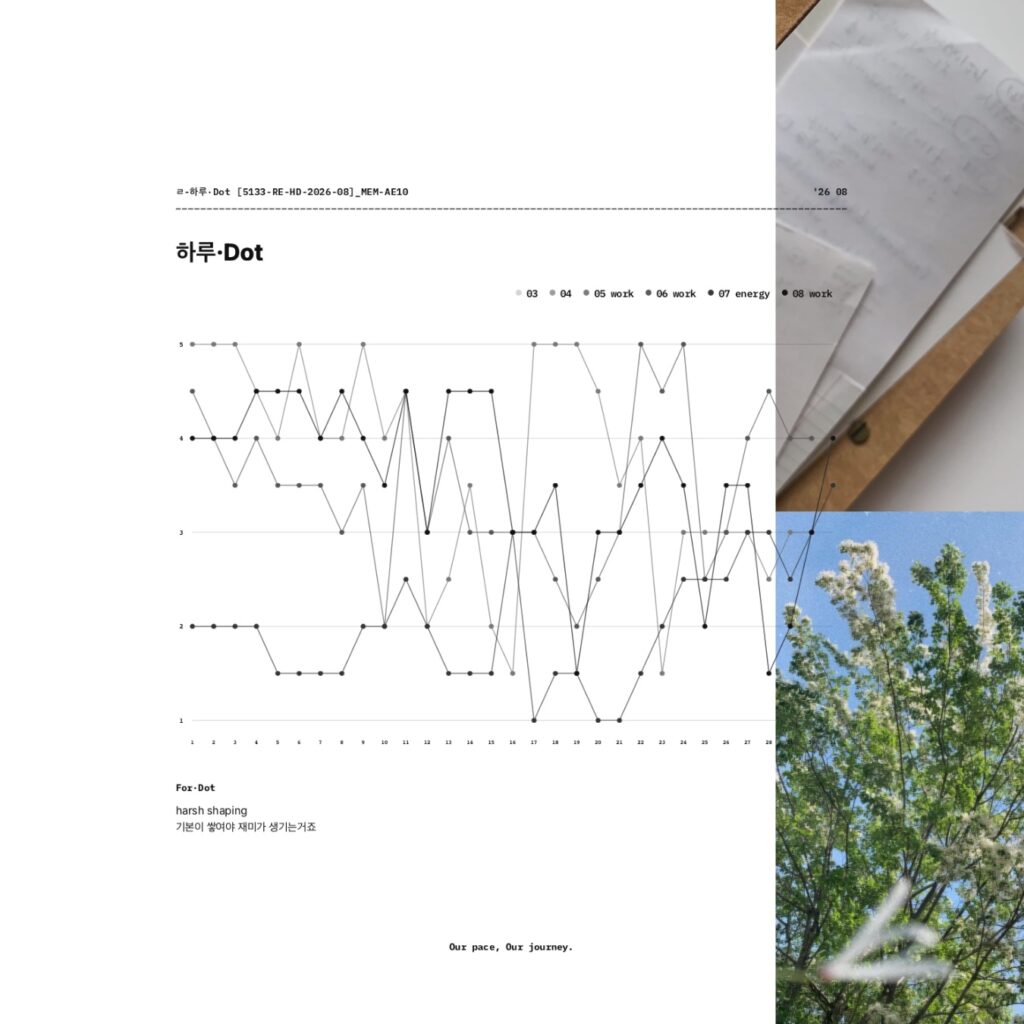
      The 6-month view places the available records within a wider time frame.

      This makes it easier to step back from individual days and see how separate entries relate across months.

      하루·Dot 6-month view showing available rating lines on a 1–5 scale beside photos of notes and green trees.

      1Y — See the Record in a Full-Year Frame

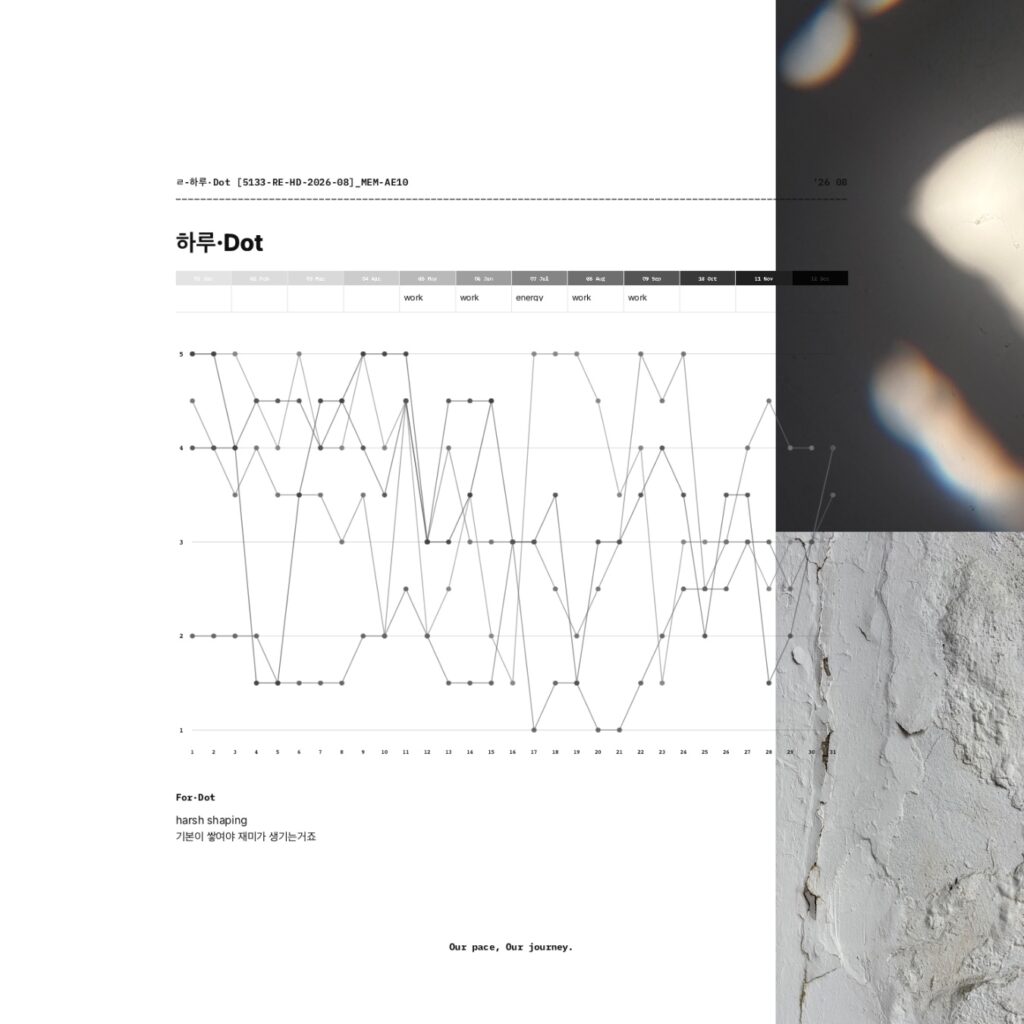
      The 1-year view gives you the widest frame available in 하루·Dot.

      By placing the record within a January-to-December layout, it becomes easier to look beyond individual days and see the overall shape of what has been recorded.

      하루·Dot 1-year view showing available rating lines within a January-to-December layout beside abstract light and textured wall photos.

      하루·Dot does not decide what those lines mean for you.

      It gives you a way to look at what you have recorded and notice what stands out from where you are now.

      Choose What the Dot Means

      There is no single required meaning for a 하루·Dot score.
      The Lens is the part you choose.

      For example, you might track:

      • Mood
      • Energy
      • Focus
      • Physical condition
      • Work

      Something specific to your own routine
      The point is not to find the “right” thing to measure.

      Choose something you want to keep noticing.

      A mood Lens can work as a lightweight mood journal.

      An energy Lens can show how your perceived energy changes from day to day.

      A work Lens can leave a simple record of how work felt during a particular period.

      The scale remains simple. The meaning comes from the Lens you give it.

      For·Dot — Add a Little Context

      Below the graph is For·Dot, a space for a short line of text.

      You can leave a word, sentence, or small note when a dot alone is not enough for what you want to remember.

      The graph keeps the flow visible.

      For·Dot adds a little context beside it.

      Can I Use 하루·Dot With Goodnotes?

      Yes.

      하루·Dot is recorded in Flowhere, but you can export the page whenever you want as:

      • PNG
      • JPG
      • PDF

      You might record part of a month in Flowhere, export that view to Goodnotes, and continue by adding handwriting, notes, or other material there.

      Or you can keep adding dots in Flowhere and export particular 1M, 3M, 6M, or 1Y views whenever you want to keep one elsewhere.

      Flowhere and Goodnotes do not have to be separate workflows.

      You can let the dot record continue to develop in Flowhere and bring any view into Goodnotes whenever that fits the way you want to journal.

      Prefer to Record the Month With Photos?

      If numbers and lines are not how you want to remember a month, BOM Grid offers another visual approach in Flowhere.

      Instead of giving the day a score, you leave photographs by date and let the month build into one photo grid.

      → Explore BOM Grid — A Monthly Photo Journal in Flowhere

      Start With Today’s Dot

      You do not need to explain the whole day.

      Choose what you want to keep noticing.

      Decide where today sits on your scale.

      Leave one dot.

      Tomorrow can be another.

      As the record grows, you can step back and see the flow taking shape.

      One dot a day. A flow over time.

      𝑶𝒖𝒓 𝒑𝒂𝒄𝒆, 𝑶𝒖𝒓 𝒋𝒐𝒖𝒓𝒏𝒆𝒚.

    2. Monthly Photo Journal for September 2026 — BOM Grid in Flowhere [no.5133]

      Monthly Photo Journal for September 2026 — BOM Grid in Flowhere [no.5133]

      Looking for a way to record a month with photos instead of filling a planner with long entries?

      BOM Grid in Flowhere is a digital monthly photo journal that lets you place photos directly into the dated spaces of a monthly calendar and see the month as one visual grid.

      You can record online, move between months and years, save your page, and export the finished grid as PNG, JPG, or PDF for GoodNotes or your own files.

      You do not need to add a photo every day. The images you keep—and the spaces you leave open—become part of what that month looked like.

      The featured image shows my actual August 2026 BOM Grid after a month of use.

      This post looks at how the same format continues into September and how individual photos can gradually become one visual record of a month.

      September 2026 BOM Grid at a Glance

      ItemDetails
      FormatDigital monthly photo journal
      Current monthSeptember 2026
      Main recordPhotos placed by date
      One-line recordFor My BOM
      Move between months / yearsYes
      Save pageYes
      ExportPNG · JPG · PDF
      Transparent PNGYes
      GoodNotes useExported JPG / PDF can be kept in GoodNotes
      Blank layoutDownload available
      ArchivePhoto records can continue into Flowhere Archive

      What Is BOM Grid?

      BOM Grid is a dated monthly page for recording a month through photographs.

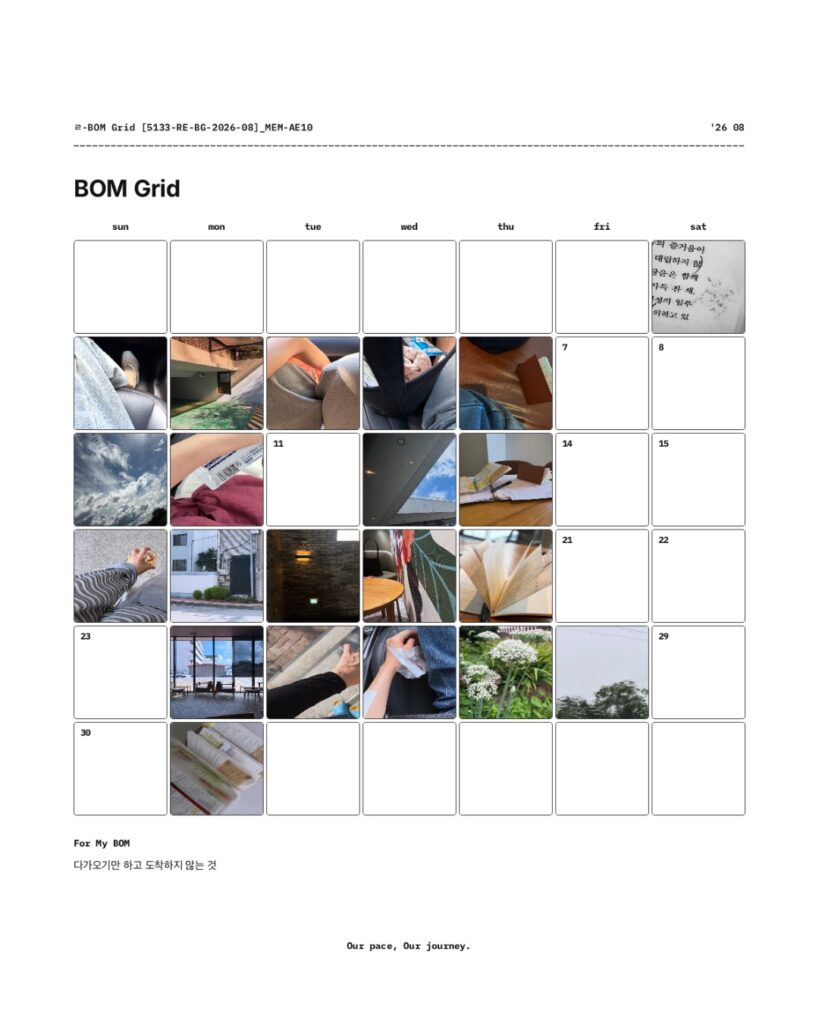
      Each date can hold an image you want to remember from that day—a sky, a familiar place, a book, a drink, a person, a patch of light, or anything else that caught your attention.

      You do not have to fill every date.

      Unlike a photo album, where images are usually viewed one at a time, BOM Grid keeps the month together on a single page.

      As photos accumulate across the calendar, you can begin to see the month as a whole rather than as a series of separate images.

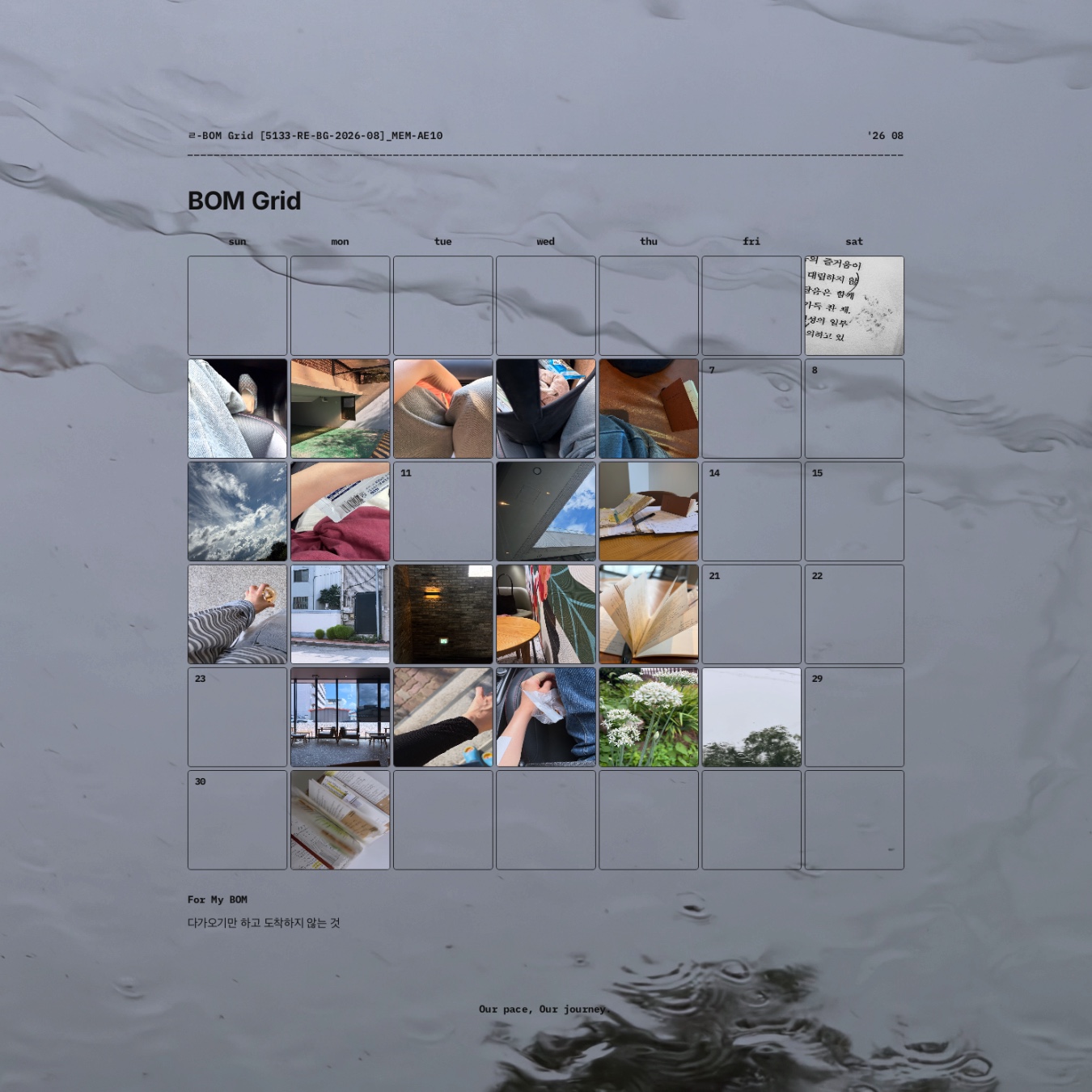
      August 2026 BOM Grid in Flowhere with photos arranged by date, including sky, books, indoor scenes, streets, and flowers.

      One Photo at a Time, One Month at a Glance

      A traditional monthly planner usually centers on schedules, tasks, and written notes.

      BOM Grid starts with photographs instead.

      One day might hold a photograph of the sky.

      Another might show a place you returned to, something you were reading, or a small moment you wanted to keep.

      Some dates may remain empty.

      That does not make the record incomplete.

      When the month is viewed as a grid, the photographs and the open spaces together show the rhythm of what you chose to notice and keep.

      For anyone who enjoys journaling but does not always want to write a full entry, one image can be enough to mark a day.

      For My BOM — One Line Beneath the Month

      Below the photo grid is For My BOM, a small space for one line of text.

      You can use it for a sentence you want to remember, a word that represents the month, or a short thought that belongs with the photographs above it.

      The photographs hold the individual scenes.

      For My BOM gives you one place to leave a line for the month as a whole.

      It does not need to summarize everything.

      Sometimes one sentence is enough.

      Can I Use BOM Grid With GoodNotes?

      Yes.

      BOM Grid is recorded in Flowhere, but the finished page can also be taken outside the web app.

      You can export your record as:

      • PNG
      • JPG
      • PDF

      A PDF can be kept in GoodNotes as part of a digital journal, while a JPG can be saved with your other photo records.

      This means you can use Flowhere to build the monthly grid and still keep the finished page in the digital notebook or file system you already use.

      Use a Transparent PNG on Your Own Background

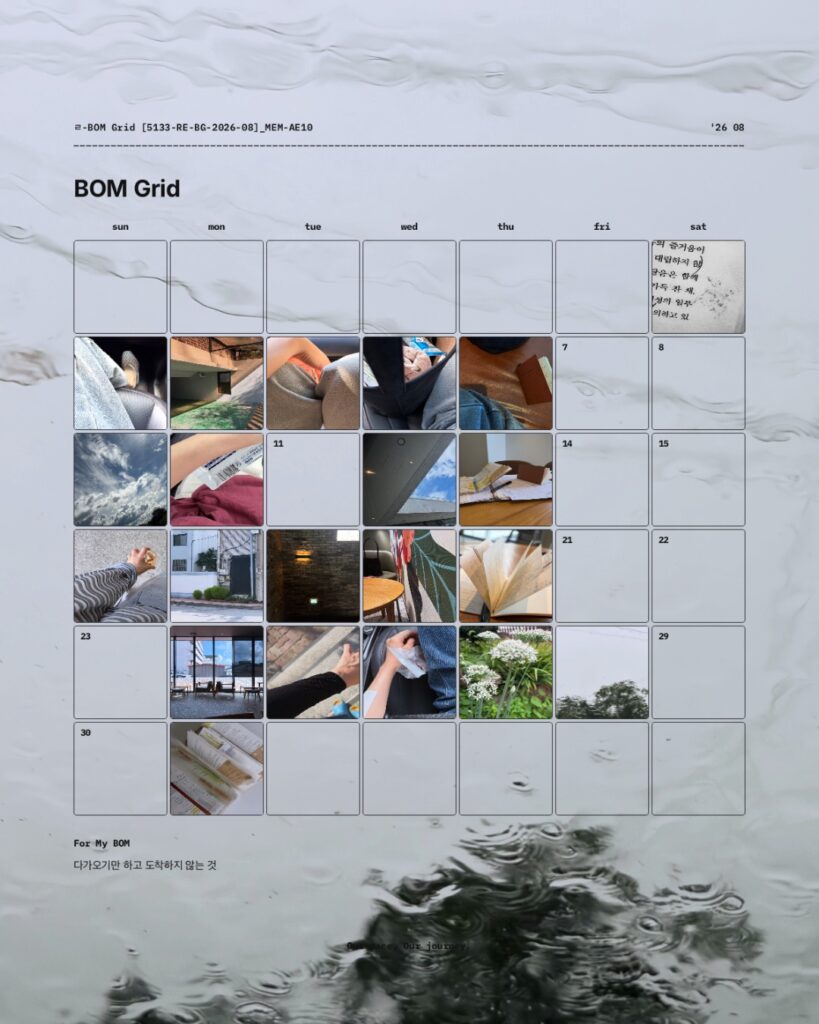
      BOM Grid can also be exported as a transparent PNG.

      Because the background is removed, you can place the completed monthly grid over your own photograph, texture, illustration, or other visual background.

      The same monthly record can therefore be kept as a clean grid or recomposed as a more personal visual page.

      August 2026 BOM Grid placed over a water-textured background to show a customized monthly photo journal layout.

      What Happens to the Photos After the Month Ends?

      A BOM Grid does not have to become a finished image that you never look at again.

      Records saved in Flowhere can continue into the Archive.

      Over time, an ordinary photograph can become meaningful for a different reason.

      A place you passed every day may later bring back a particular period of your life.

      A photograph that felt unimportant at the time may return with the atmosphere of a season.

      And as monthly photo records accumulate, you can return to the scenes you chose to keep rather than searching through an entire camera roll.

      The photograph stays the same.

      What it brings back can change with time.

      A Real BOM Grid From August 2026

      The August 2026 record shown in the featured image lets you see what BOM Grid looks like after a month of actual use rather than as an empty template.

      The point is not to create a perfectly filled calendar.

      It is to keep the photographs you chose connected to their dates and to one another.

      Viewed together, those individual photographs become one visual record of August.

      September does not need to look the same.

      A different month can hold different scenes, a different number of photographs, and a different rhythm.

      Prefer a Writing-Based Monthly Journal?

      If you want to record schedules, notes, project traces, and reflections rather than make photographs the main record, Reflection Monthly offers a different way to keep the month in Flowhere.

      → Explore September 2026 Reflection Monthly in Flowhere

      Start Your September 2026 BOM Grid

      You do not need to wait until you have a complete month of photographs.

      Start with one scene from September.

      Add another when something is worth keeping.

      Let the grid take shape as the month continues.

      One month of scenes. One grid to return to.

      𝑶𝒖𝒓 𝒑𝒂𝒄𝒆, 𝑶𝒖𝒓 𝒋𝒐𝒖𝒓𝒏𝒆𝒚.

    3. A Real Monthly Journaling Example — August 2026 in Reflection Monthly [no.5133]

      A Real Monthly Journaling Example — August 2026 in Reflection Monthly [no.5133]

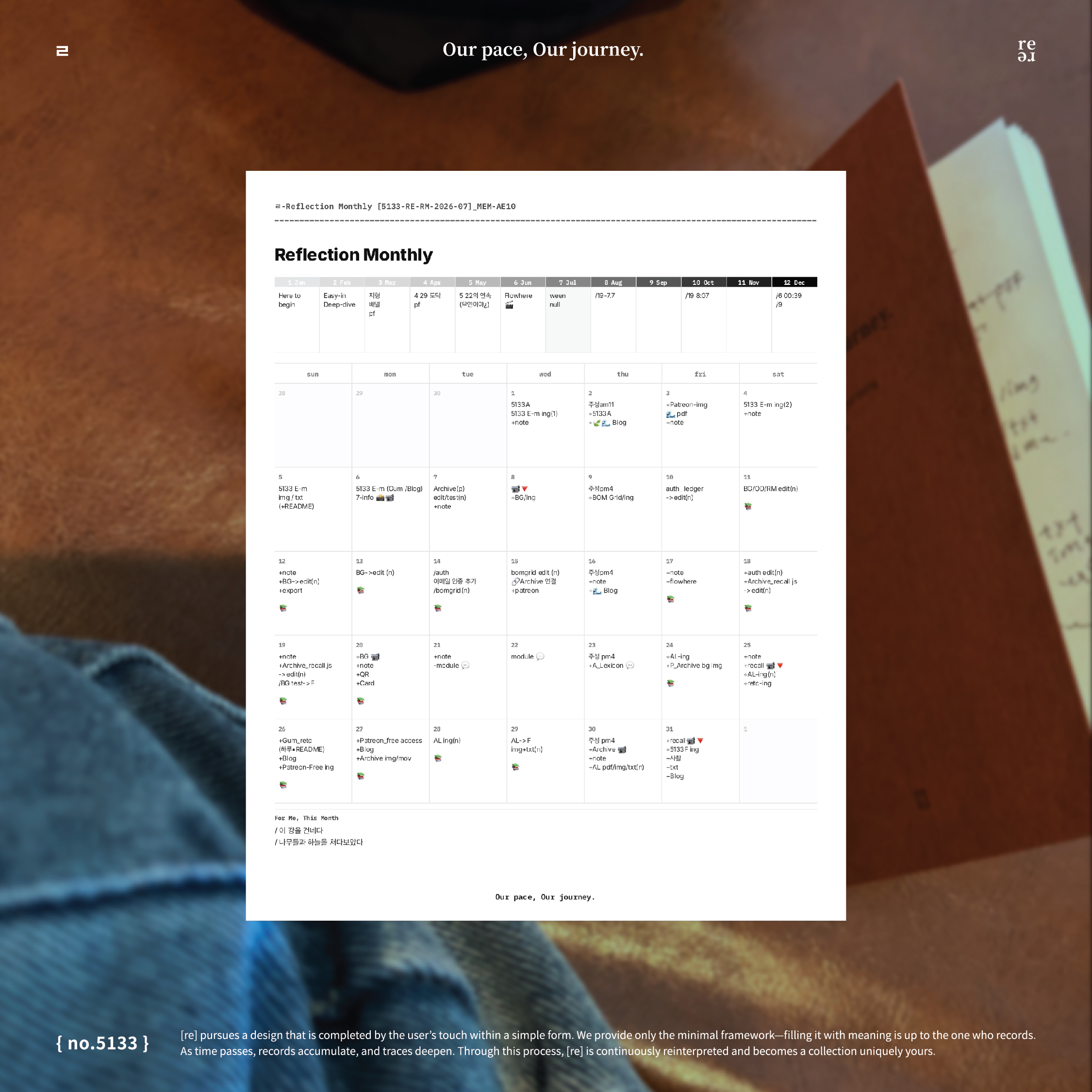
      This is my actual Reflection Monthly page from August 2026.

      By the end of the month, every date contained a record.

      Most of the monthly grid reflects what filled my days at the time: ongoing projects, edits, schedules, reminders, and short notes.

      Above it, the 12-month Reflection Box holds a different kind of record—brief words, dates, and thoughts I left while looking across the year from August.

      The two sections record the same period from different perspectives.

      The monthly grid records what filled the month.

      The Reflection Box captures how I saw the year from that point in time.

      This is how I used Reflection Monthly in August 2026.

      August 2026 Reflection Monthly at a Glance

      ItemDetails
      Record shownAugust 2026
      Monthly GridProjects · Schedules · Notes · Reminders
      Reflection BoxWords · Dates · Short reflections across 12 months
      FormatDigital monthly journal
      Save pageYes
      ExportJPG · PDF
      GoodnotesExported pages can be kept in Goodnotes
      ArchiveRecords can continue into Flowhere Archive

      Inside My August 2026 Monthly Grid

      August was a work-heavy month for me.

      The monthly grid includes project names, edits, images, exports, blog work, archive work, schedules, reminders, and short notes.

      I did not record only finished work.

      The smaller steps stayed on the page too.

      An edit.

      A file to export.

      Something to check again.

      A project still in progress.

      Even a short practical note becomes part of the month when it stays connected to the date it happened.

      I did not try to give work, planning, and personal notes equal space.

      I simply recorded what was actually part of the month.

      Some months may contain more personal notes or photographs.

      August 2026 happened to contain a lot of work in progress.

      That is what the page reflects.

      How I Use the 12-Month Reflection Box

      The Reflection Box works differently from the monthly grid.

      Instead of recording what happened day by day, I use it to look across the year from the month I am currently in.

      Some boxes contain a word.

      Others contain a date, a short phrase, a thought, or a small mark.

      They are not meant to be complete summaries of each month.

      They capture how I saw those months from that particular point in time.

      January seen from August is not necessarily the same January I saw while living through it.

      A month that has already passed can take on a different meaning later.

      A month still ahead can carry an expectation that changes once I reach it.

      The year itself stays the same, but the way I see it can change depending on where I am within it.

      That changing perspective becomes part of the record.

      The monthly grid shows what filled the month.

      The Reflection Box shows how I was looking at the year from that month.

      Why I Keep Small Records on Their Dates

      A short note can seem insignificant on its own.

      “Edit.”

      “Archive.”

      “Export.”

      A reminder.

      A project name.

      But the date gives it context.

      Later, I can see not only what I finished, but also what I was working through, what kept returning, and where my attention was going.

      That is one reason I do not think a monthly journal has to be a long diary.

      A few words can be enough when they stay connected to the time in which they happened.

      As those small traces accumulate, the month becomes easier to see as a whole.

      What This August Page May Show Me Later

      Right now, this page mainly shows what I was working on in August 2026.

      Later, the same page may help me remember something more.

      What I was building.

      What repeatedly held my attention.

      What kind of rhythm my days had.

      What mattered enough to write down.

      And when another August is recorded, comparison begins.

      August 2026.

      August 2027.

      August 2028.

      The month stays the same.

      The person recording it does not.

      In Flowhere Archive, records from the same month across different years can eventually become a five-year mirror.

      A practical note that feels ordinary now may later help me remember what that period was actually like.

      That is how an ordinary monthly record can gradually become part of a personal archive.

      Try Reflection Monthly With Your Current Month

      The page shown here is from August 2026.

      Your month does not need to look like mine.

      Start with what is actually filling your days now.

      A project.

      A schedule.

      A sentence.

      A reminder.

      A date.

      Something you want to remember.

      You do not need to decide what kind of journal the page should become before you begin.

      Start with what is there.

      Start with the month you are in now.

      Prefer a Downloadable Monthly Planner?

      If you prefer to begin with a PDF, the current Reflection Monthly is also available as a downloadable monthly planner during its featured month.

      Download the Current Reflection Monthly PDF

      Frequently Asked Questions

      Do I need to fill every date?

      No.

      The August 2026 page shown here happens to contain a record on every date, but Reflection Monthly does not require daily recording.

      Can I export my Reflection Monthly page?

      Yes.

      Completed pages can be exported from Flowhere as JPG or PDF files.

      Can I keep the page in Goodnotes?

      Yes.

      Exported JPG or PDF pages can be kept in Goodnotes or another digital notebook.

      A Month Becomes a Record

      A month does not need to be extraordinary to be worth keeping.

      Sometimes a month is remembered through projects, short notes, reminders, dates, and small details that seemed ordinary at the time.

      Together, they leave a record of one period in your life.

      Record the present. Meet it again later.

      𝑶𝒖𝒓 𝒑𝒂𝒄𝒆, 𝑶𝒖𝒓 𝒋𝒐𝒖𝒓𝒏𝒆𝒚.

    4. September 2026 Digital Monthly Planner in Flowhere — Reflection Monthly for Journaling & Goodnotes

      September 2026 Digital Monthly Planner in Flowhere — Reflection Monthly for Journaling & Goodnotes

      Looking for a monthly planner that you can use online and continue over time?

      Reflection Monthly in Flowhere is a digital monthly recording page where you can plan, journal, and keep the flow of a month on a single page.

      You can write directly in Flowhere, move between months and years, save your page, and export completed records as JPG or PDF files for use in Goodnotes or your personal archive.

      This post shows a real Reflection Monthly record from August 2026 and how the same format continues into September.

      Rather than starting from a fixed journaling method, Reflection Monthly leaves the page open so that schedules, notes, emotions, projects, and small traces of daily life can exist together.

      September 2026 Reflection Monthly at a Glance

      ItemDetails
      FormatDigital monthly recording page
      Current monthSeptember 2026
      Main structure12-month Reflection Box + dated monthly grid
      Record onlineYes
      Move between months / yearsYes
      Save pageYes
      ExportJPG · PDF
      Goodnotes useExported PDF / JPG can be used in Goodnotes
      ArchiveRecords can continue into Flowhere Archive
      Long-term viewSame-month records can become a five-year mirror

      What Is Reflection Monthly?

      Reflection Monthly is a one-page monthly record designed for both planning and reflection.

      It can hold schedules, thoughts, emotions, notes, project traces, photos, and small pieces of everyday life without requiring every part of the page to follow the same method.

      You can use one day for an appointment, another for a short sentence, and leave another completely empty.

      The point is not to complete every box.

      The page simply becomes a record of what the month looked like from where you were at that time.

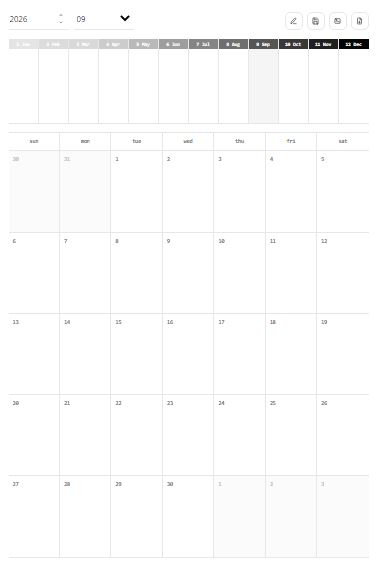
      Blank September 2026 Reflection Monthly page in Flowhere with a 12-month Reflection Box and dated monthly grid

      1. See 12 Months From Where You Are Now — Reflection Box

      At the top of the page is the 12-month Reflection Box.

      It is not designed simply to summarize an entire year.
      Instead, it lets you look at the months that have already passed and the months still ahead from the month you are currently in.

      A word, a short sentence, a date, a feeling, or even a small mark is enough.

      An August Reflection Box and a September Reflection Box may contain different impressions of the same year because your point of view has changed.

      Over time, these small notes become a record of how your perspective on the year shifts.

      September 2026 Reflection Box in Flowhere showing all 12 months from the current month

      Plan, Journal, and Record on One Monthly Grid

      The dated monthly grid below the Reflection Box is intentionally open.

      You can use it for:

      • Schedules
      • Daily notes
      • Mood records
      • Short journal entries
      • Project tracking
      • Monthly reflections

      There is no requirement to use every day in the same way.

      Some days may contain several notes, while others may remain empty.

      The result is not only a planner. It becomes a visual record of the rhythm of the month.

      Can I Use Reflection Monthly With Goodnotes?

      Yes.


      Reflection Monthly is designed to work both as a web-based monthly record and as a page you can keep outside Flowhere.

      After recording in Flowhere, completed pages can be saved as JPG or PDF files.

      You can then keep the exported PDF in Goodnotes, add it to another digital notebook, or save the JPG as part of your personal archive.

      This means you do not have to choose between web journaling and keeping your own files.

      You can record online first and export the pages you want to keep.

      Prefer to start with a blank downloadable version?
      Download the Free September 2026 Reflection Monthly PDF

      What Can You Do With Reflection Monthly in Flowhere?

      In Flowhere, Reflection Monthly lets you:

      • Move between months and years
      • Record directly on the monthly page
      • Save a page while you are working
      • Download completed pages as JPG
      • Download completed pages as PDF
      • Return to earlier monthly records
      • Keep records connected through the archive
      • Revisit the same month across years

      A downloaded monthly planner usually ends when the file is completed.

      In Flowhere, the page can remain part of a longer record.

      You can return to an earlier month, look at what was left there, and continue building a personal archive over time.

      From One Month to a Five-Year Mirror

      A Reflection Monthly page is not designed to disappear after the month ends.

      When September records accumulate across different years, the same month can eventually be viewed from different points in your life.


      September 2026.

      September 2027.

      September 2028.


      The calendar month stays the same, but the person looking through it changes.

      In the Flowhere Archive, these same-month records can become a five-year mirror—a way to encounter your earlier self from where you are now.

      The purpose is not simply to compare numbers or productivity.

      It is to look back through previous records and notice what remained, what changed, and what you see differently now.

      A Real Reflection Monthly Record From August 2026

      The August record shown in this post contains schedules, short notes, project traces, reminders, and small marks across a single month.

      Not every day is filled in the same way.

      That unevenness is part of the record.

      Reflection Monthly does not ask each month to become a perfectly organized planner page.
      It leaves enough structure to hold the month while allowing the way you use it to change.

      September can look completely different.

      Start Your September 2026 Reflection Monthly

      September is already moving.

      You can begin with what is happening now rather than trying to reconstruct every day from the beginning of the month.

      Open the current September page, leave the records that matter to you, and let the rest remain open.

      As the months continue, those pages can become something you return to—not only to remember what happened, but to look again at who you were then.

      Record online, save the pages you want, and continue the same month across time.

      One Month, Seen From Where You Are Now

      Reflection Monthly begins with one month on one page.

      But as those pages accumulate, they become more than monthly planners.

      They become different views of the same life, left at different points in time.

      See the year from where you are now.

      𝑶𝒖𝒓 𝒑𝒂𝒄𝒆, 𝑶𝒖𝒓 𝒋𝒐𝒖𝒓𝒏𝒆𝒚.